
This post may contain affiliate links. Please see our disclosure policy.
Learn how to use Ancestry.com‘s MyTreeTags to manage your genealogy research projects and improve your genealogy organization.
At RootsTech 2019, Ancestry.com announced three new exciting tools genealogy researchers can use in their research: MyTreeTags, and ThruLines . Initially in beta, the tools are a full part of Ancestry.com now. Try them out!
I was immediately drawn to the MyTreeTags tool. With MyTreeTags, Ancestry.com has given users the ability to tag (or label) individual ancestors for better organization and genealogy research project management.
I’m all about genealogy organization and better project management, and MyTreeTags fits into my workflow seamlessly.
Why MyTreeTags?
First things first. What is a “tag”?
A “tag” is simply a label. If ancestor is tagged, he/she has been labeled.
Not sure what to label an ancestor? Keep reading.
MyTreeTags allows the genealogy research to add a tag – or label – an ancestor’s profile in their family tree.
A Tag = A Label 📝
Consider this – You want to add an ancestor to your family tree. While you are not 100% sure that ancestor really is your GGGG grandfather, but you are pretty sure.
Now you can add a label or tag “Hypothesis” or “Unverified” to that ancestor. The MyTrees Tag is visible to viewers of your tree, and allow you to continue to research and work on that ancestor without worrying the information will mistaken for a verified ancestor.
Here is another example.
You have a particular interest in your ancestors who participated in the Revolutionary War. You are considering writing a family history on those ancestors and their activities in the war. You can tag each ancestor with the “Revolutionary War” label.
Ready to write your book? Search your family tree by the tag “Revolutionary War”.
How To Use the MyTreeTags Feature
1.Go to the profile page of the ancestor you are researching or interested in tagging. In this example, I am using the profile for my 5th Great grandfather James Harward.
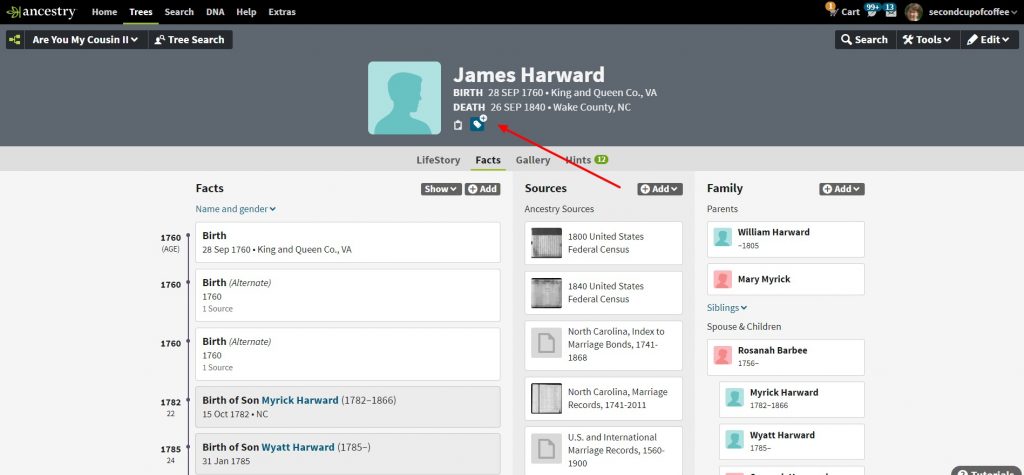
2. Click on that little blue tag button under the vital information. You will see a new workspace open up on the right side of the page. In this workspace, you can easily toggle between MyTreeTags, Notes and Comments. For now, stay on MyTreeTags.
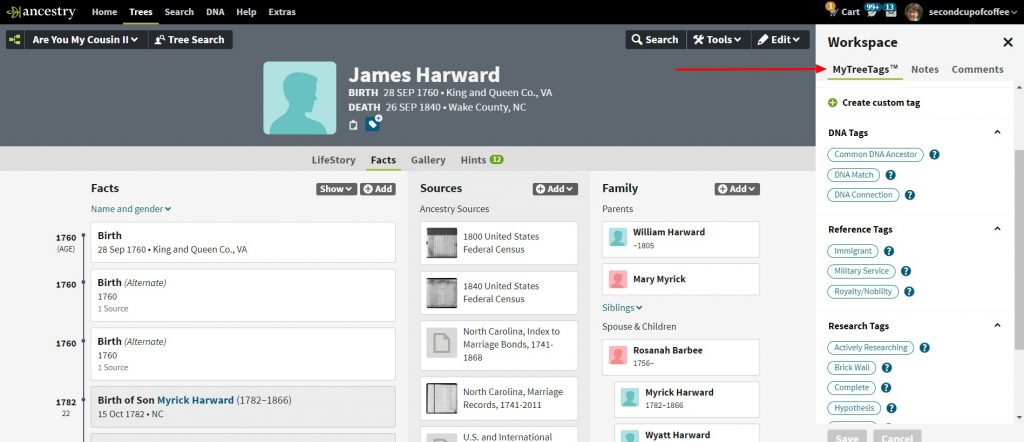
3. Under MyTreeTags you can choose one or more tags (or labels) to add to that ancestor. You will find pre-set tags already suggested for under the categories of DNA tags, Reference tags, and Research Tags.
[I shudder to think how many “Brick Wall” ancestors I need to tag!]

Click on the “?” for more information on a particular tag’s description.
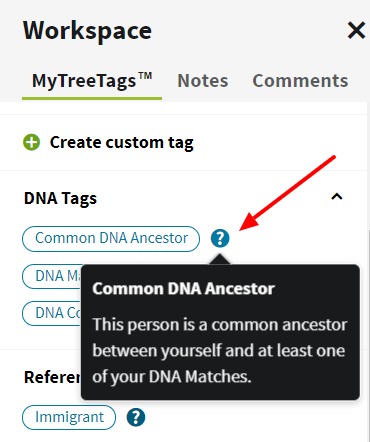
Here I’ve tagged James Harward as “Military Service”. Going forward I can search my tree tags for “Military Service” and find all ancestors tagged as such.

4. You as the researcher also have the ability to create a custom tag if one of the pre-set tags does not meet your needs.

Custom tags could be a location such as “Surry County, NC” or “North Carolina”. Perhaps tagging an ancestor with their occupation would be useful in your research. You can literally create whatever custom tag you would find useful.
I’m enjoy using the MyTreeTags in my family tree. Give it a try, and share your experiences with MyTreeTags in the comments below.







Will a Tag help me locate/connect the First Nations people in my tree?
Always,
Jean, MyTree tags would only help you find First Nations people that you have previously tagged as such. For instance, you add a person to your tree (or edit that person) and add a custom MyTree tag “First Nations”. In the future, when you are looking for all ancestors labeled as “First Nations” you can quickly and easily find them.
I love this new feature! I made custom tags for the different wars so at a glance I know which war they fought in. I also made a custom tag for my pilgrim ancestors. I suggested to Ancestry that it would be nice if we could do a search using these tags (I.e. show all Pilgrim ancestors, show everyone who fought in the Revolutionary War, etc).
I’ve been creating different tags for specific wars, too. It’s helpful to be able to go back pull just the ancestors for a specific war when I’m doing cluster research.
You can search by tags. When you have your tree on the screen, do a tree search. Click on filters and you can choose which tags to search by.
Thanks for this post/reply. It answered a question I’ve had for a long time. Now if there were some way to print the results.
Thanks,
Bryan
So glad it helped!
I love the new Tree Tags and have created several new custom tags. I marked my direct ancestors with the provided tag. But I created a custom tag to rag my husband’s direct ancrstors. I also created tags for people I am corresponding with, those I have painted on DNAPainter and those included on my Leeds Method spreadsheet.
What great ideas for custom tags!
I already love it! I, too, have made specific tags for the war service of my ancestors. I have also created more than one tag for some. My question, Lisa, is whether I am limited in the number of tags? I have tried to make more than two tags for one ancestor and am unable. Would that be a kink in the beta system, or might it be a rule – no more than two tags? I hope not!
I love the Tree Tags. The only problem I can see, is when Tree Tags are enabled and by chance you view a tree of another person, when you try and chose to go to the home person, as set by the owner of the tree, you are prompted to make youself the home person or choose someone from their tree. Granted, sometimes the home person someone sets for their tree is interesting, that should still be your first option. Once Tree Tags are disabled, the prompt for the home person disappears nd you can go to the home person as set by the owner. I’ve been toggling back and forth having Tree Tags enabled/disabled. Did the survey multiple times to report it.
Are these custom tree tags visible to other researchers? I surely hope so, because I want them to be able to see which ones I question, so they won’t use the info! Thank you. And, thanks for the excellent explanation.
If you are using Family Tree Maker with Ancestry.com sync, will these tags and hypothetical people sync and show up on that tree as well?
Currently MyTree Tags will not sync with Family Tree Maker. My understanding from the Ancestry folks at Rootstech is that is something they are working on.
Great new feature – though you’d have to say its long overdue.
My custom tags from ‘Down Under’ – “convict” of course – and as some said above I use pre-set ‘military’ but add custom tags for the details – WW1 WW2 etc.
Great examples of custom tags!
Can you search tags in other’s trees?
If a tree is public, Ancestry members can see the tags, so you should be able to search those tags.
I have been playing around with the MyTreeTags and I am sure how useful they will be. After tagging many of my ancestors, searched on them, then I wanted to print out the list and there is no way to print. With some changes they may be useful, but right now I’m not seeing it.
MyTree Tags are still in Beta with Ancestry, and you make a great point. I would encourage you to provide your feedback to Ancestry.
My tree tags have disappeared and now the option is gone as well.
Barbara, My tree tags are intact as well as the option to add more. Let me check into it.